Why WordPress is the best software for your website
Discover why WordPress is the ultimate choice for building your website.

WordPress has been the most popular Content Management System (CMS) for over a decade, and its dominance continues in 2023. WordPress usage statistics show that it is the preferred platform for website creation and management for millions of individuals and organizations worldwide. Here are some of the most recent WordPress usage statistics that demonstrate its growth and popularity.
WordPress is powering 41% of all websites globally, as of 2023. In other words, four out of every ten websites you visit are likely to be built on WordPress. This statistic has been growing steadily over the years and is a testament to the platform’s flexibility, ease of use, and versatility.
In terms of the types of websites built on WordPress, it caters to a wide range of industries and niches. WordPress powers everything from personal blogs and small business websites to large e-commerce stores, news websites, and even government portals.
WordPress usage statistics show that the platform is also popular with developers, who use it as a base for building custom websites and applications. WordPress’s open-source nature means that it’s highly customizable and extendable, making it an ideal platform for developers to work with.
When it comes to market share, WordPress is the clear leader in the CMS space. As mentioned earlier, it powers 41% of all websites, with the next closest CMS being Joomla, which has a market share of just 2.8%.
WordPress’s dominance in the market is unlikely to change anytime soon, as it continues to grow in popularity and attract new users. Its vast community of developers, designers, and users creates a virtuous cycle that reinforces its position as the go-to platform for website creation and management.
While WordPress is the clear leader in the CMS space, it’s worth comparing it to other popular platforms to see how it stacks up.
One of WordPress’s main competitors is Wix, a cloud-based website builder that has been growing in popularity in recent years. However, WordPress still has a significant lead over Wix, with a 41% market share compared to Wix’s 3.3%.
Another competitor is Shopify, a platform that specializes in e-commerce websites. While Shopify is the leader in the e-commerce space, with a 10% market share, it still trails behind WordPress’s overall market share.
Overall, WordPress’s flexibility and versatility make it a more attractive platform than specialized solutions like Shopify, which are limited in scope.
In today’s mobile-first world, it’s essential for websites to be mobile-friendly. WordPress has made significant strides in this area, with mobile usage accounting for a substantial portion of its overall usage.
WordPress mobile usage statistics show that over 50% of all WordPress websites are accessed via mobile devices. This is a significant increase from just a few years ago when mobile usage was closer to 30%.
This increase in mobile usage can be attributed to several factors, including the rise of mobile devices and the increasing importance of mobile-friendly websites for search engine optimization (SEO).
One concern that many users have when it comes to WordPress is security. WordPress is often targeted by hackers and malicious actors due to its popularity and the large number of websites built on the platform.
However, WordPress has made significant strides in improving security in recent years. The platform is regularly updated with security patches and fixes, and there is a robust ecosystem of security plugins and services available to WordPress users.
WordPress’s security features and practices make it a safe and secure platform for building and managing websites. As with any platform, users must take appropriate security precautions, such as using strong passwords and keeping their WordPress installations up to date.
All of our web hosting packages come with WordPress Toolkit to allow you to install, update and manage WordPress from a single user-friendly interface. Why not give it a try?
Font Awesome is a wonderful, quick and easy way to include icons on your website. The icons are provided in the form of a font – you simply reference the icon you want and it loads up. No worrying about file resolutions or colours, and there are thousands of different icons available. 16,083 icons at the time of writing – and 2,009 you can use completely free of charge. Many WordPress themes come with Font Awesome integrated, or there are plugins available to add them to your site if they aren’t already there.
One of the downsides to this ever-growing library is that the font files used have become quite large. You can integrate them onto your site using a free public CDN copy to reduce the load and increase the chance that users have a local copy cached. Through a preference not to use any public CDN for privacy and tracking reasons, this wasn’t a solution for us.
As a starting point, we were using 2 font awesome fonts on our website – Brands & Regular (pro). These were the latest woff2 format but they still represented a 240kb chuck of our website, around 30% of its total size.
You can download your starter fonts from Font Awesome, here: fontawesome.com/v5/download – you need the Web version. We’re using v5 in this instance as an SVG version of the font is included. If you wish to use v6 you’ll first need to convert a TTF font into SVG format.
Once you unzip your download you’ll see a folder called ‘webfonts’ containing the files you need.
Font Forge is a freely available piece of software, designed to allow you to create or edit fonts. It is available for Windows, Mac and Linux.
https://fontforge.org/en-US/downloads/
Just click ‘File’ followed by ‘Open’ and select the SVG version of the Font Awesome collection you wish to start with.
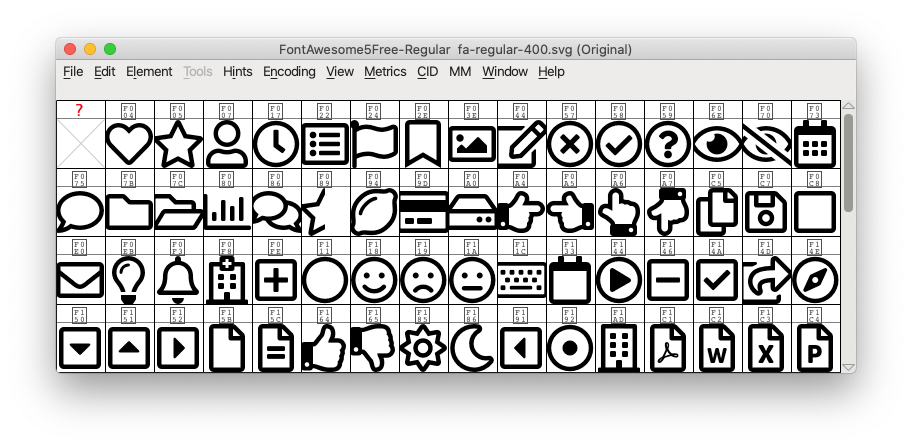
Now, scroll through and select the icons you wish to use. You can select multiple fonts by using Shift+click on Mac or cmd+click on Windows.
When you have the ones you want, click the ‘Edit’ menu, go to ‘Select’ then ‘Invert Selection’. The icons highlighted should now be the ones we wish to remove.
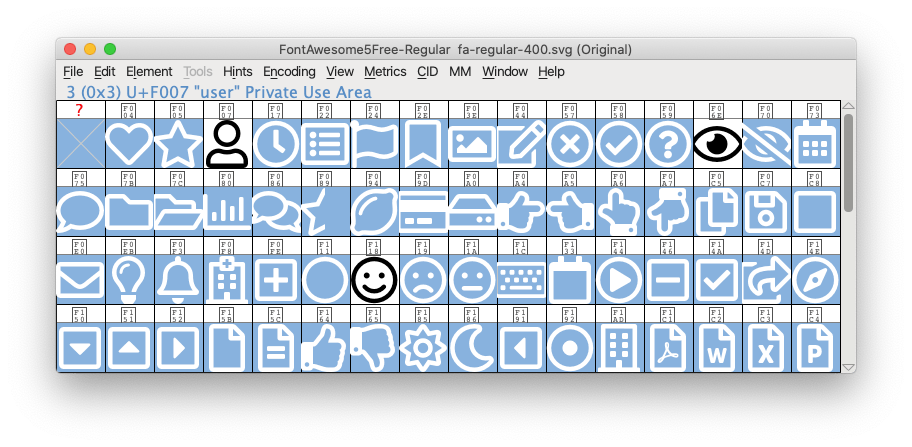
From the ‘Edit’ menu, select ‘Clear’. We will now just have the icons left that we wish to use.
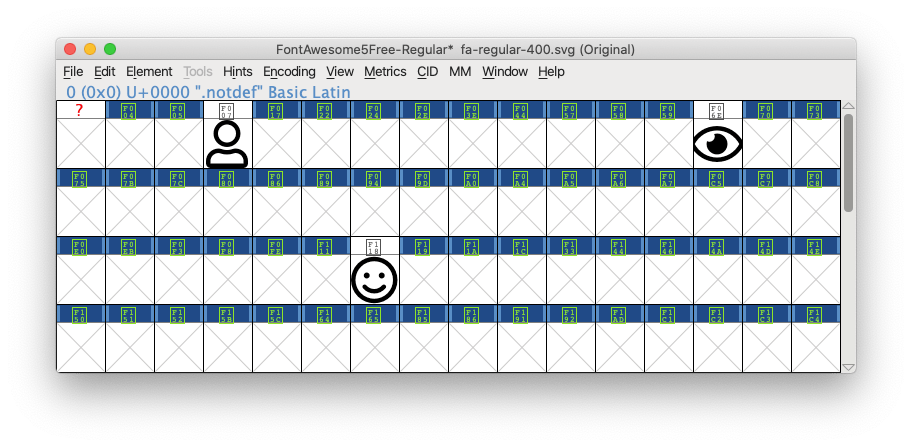
To export the font, click ‘File’ and ‘Save As’ then select a file name and location. The exported file will be a .SFD file.
Woff2 is now the most common and best-suited font file format for most use cases. To convert our new font we need to use an online tool. Everything Fonts provides an excellent converter here: everythingfonts.com/sfd-to-woff2
After making a backup copy of the original file, just in case, you should now be able to replace it with your new file without any further changes. Make sure the file name remains the same.
For many WordPress themes, you’ll be able to select the new file as part of the configuration to make this job even easier.
If you’re currently downloading your Font Awesome file from a CDN you may also need to switch any references, or update plugin settings, to use your new file. You’ll also need to upload it to your website.
For our own site, the files were reduced in size to just 4kb. That’s a saving of 236kb for every visitor, with no visible difference to the website. As a result, it will load faster helping both improve the experience for visitors and, hopefully, improve our search rankings too! Not bad for an hour’s work.
Are you looking to start a blog, but don’t know what to write about? The good news is – the world is your oyster. There are blogs out there on all kinds of topics, and some you might never have given much thought to before. Whatever your interested or your niche, there’s a blog topic for you. Take a look at some of the following topics to start blogging about and who knows; you could soon become the internet’s next top blogger!
If you love clothes, trends and all things couture, then a fashion blog could be right up your street. Fashion bloggers cover all kinds of topics from the latest trends to style guides, reviews and general fashion topics. It can be a fun way to showcase your style and create a space that others can engage and share their ideas too.
While there are a lot of fashion bloggers out there, you can add a new angle to your blog, such as sustainable fashion, money-saving fashion tips and others. Style is unique and your blog will be too, the perfect way for you to share your love of fashion.
Everyone’s got to eat, right? That’s why food blogs are so popular. Food is a popular topic on the internet, with people constantly looking for recipes, the latest trends and just general ways to show their love of food. Your food blog can be a mix of anything from sharing your personal recipes to restaurant reviews- or a mix of the two!
Food blogs can be a wonderful outlet to show off your culinary creations. Added to an Instagram page or YouTube account, you could soon end up with a very popular channel on your hands.
Like fashion bloggers, you won’t be short of beauty bloggers online to give you some inspiration. You can write about topics such as the latest products, reviews and sharing your own beauty tips, rituals and tutorials. There’s a lot of scope for what you can write about, including hair, skincare and makeup, helping you to create a rich source of content for your readers.
Beauty blogs can be a trusted resource, providing real views and opinions that can inform buying choices and help both you and your readers indulge in their love of all things beauty.
Lifestyle bloggers blog about all kinds of topics, including a mixture of beauty, fashion, home, fitness, travel and others. If you have multiple interests and passions, then a lifestyle blog can be a great umbrella for all of the things you want to write about.
Lifestyle blogs give an insight into your life and your interests and can be a wonderful outlet for you to get creative. You can introduce new topics as time progresses and you discover new interests and ideas you’d like to share.
Love sport? Why not start a sports blog! You can use your blog to discuss all things related to sport, providing your opinions and insights on matches, teams, news and more. Sports blogs can be focused on a specific sport or even a team – whatever you’re passionate about!
Sports blogs are perfect for sports fans who want to show off their knowledge and passion and share ideas with others.
If you’re embarking on your own fitness journey, or have recently undergone a transformation, you could have a lot of useful advice for others. It can be a great way to keep yourself motivated, while also inspiring others!

Fitness bloggers can cover a range of topics, including workout ideas, nutrition advice and more. Sharing your own fitness journey can be incredibly rewarding, and could encourage others to embark on their own fitness journey too.
Political blogs have never been so popular! Many people have opinions and even insight into the latest political issues, which can make political blogs an interesting read. While many people get their political news and views from news outlets, it can be refreshing to read the views of someone else.
With politics being a part of our daily lives, there’s never been a better time to start a political blog!
Interest in all things to do with homes and interiors? Blog about it! Home improvement and interiors blogs are incredibly popular, with millions of people looking for inspiration for their homes on a daily basis. Through your home blog, you could share trends, inspiration, tutorials and showcase your own interior design and purchases.
Home blogs are a good pairing for Pinterest accounts and Instagram, so you could find yourself with some easy promotion tools to help your blog get seen!
As well as home improvement and interiors, home organisation has also taken off thanks to Netflix programmes like The Home Edit and Marie Kondo, and of course, Mrs Hinch. People love seeing homes and spaces transformed through organisation, or learning better ways to keep their homes clean – it can be addictive! So if you’ve got a special talent for home organisation or you want to share tips and ideas with others, a home organisation blog could just the ticket.
The gaming world is a big one, and if you love playing games, you could blog about them too! Gaming blogs share anything from gaming strategies and tips to reviews, and can be a good source of information for those with similar interests.
All you’ll need to do is tear yourself away from the games themselves!
Are you a film buff? Love binge-watching the latest TV shows? Then you could be in a fantastic position to write about them. Reviews and comment pieces always make great reads, while people also love to look at recommendations and ‘best of’ lists.
Why not document your viewing choices and share your news and opinions? You’ll never be short of content and could soon gain some interested readers who’d love to know what you’re currently watching.
Love reading? Why not write about it? Book reviews can make for a great blog, especially if you’re a wide reader. You could even start your own online book club!
Travel is another popular blogging topic, ideal if you love exploring and visiting new places. If you love to take photos on your travels too, you could easily create some interesting, beautiful content that people will love to look at. Travel bloggers cover all kinds of topics from destination guides to travel tips, providing a useful resource for fellow travellers and people looking for advice and inspiration.

What’s great about a travel blog is that it can serve as your own special travel diary, helping you relive all of the memories of your past adventures.
Love pets? Show your love for animals through a blog. If you have a dog or a cat (or any other kind of pet), you can show them off online, writing about their adventures and even sharing tips on how to care and train your pets. People love to read about pets, and pet blogs can also be a great source of information too.
Are you savvy with money? Love to spot a bargain or are particularly knowledgable about different finance topics? Why not start a money blog? A blog about money-saving and other topics can be extremely valuable to others and can help you share your tips and tricks with others.
From sharing the latest deals to tips on how to maximise savings, your knowledge could be really valuable to others. You never know what new money-saving methods you’ll discover for yourself too.
Do you think you could be the next Carrie Bradshaw? A blog on sex and relationships could be a great place to start. Whether you want to document your own exploits or write about different topics that people will find useful, you could have some great content for an interesting and valuable blog.
Sex and relationships can be very personal, so you might decide to remain anonymous for yours. You can get inspiration from some other blogs on the topic to help you become a top sex and relationship blogger.
Finally, why not become a blogger about blogging? Many people are looking for tips on how to improve their blogs, as well as how to monetise their posts and more. If you have an interest in writing and blogging, then your knowledge could be used to benefit others.
There are a lot of great topics you could choose from to start your blog. Many people find that while they begin blogging about one topic, they soon start incorporating others. Blogging is fun and easy to get started; all you need is a space and some posts to get you started! Whether you’re looking for a creative outlet to share your interests or you’re looking to make money from blogging, the important thing is that you simply get started and start writing!
If you have read our last article “What is WordPress?” Then you will have seen we mentioned plugins. One very popular plugin is WooCommerce with over 5 million active users, but what is WooCommerce?
WooCommerce is a free to use open-source online platform that allows you to turn your website into an E-Commerce site. This means you will be able to sell goods and services from your website. Due to WooCommerce being open-source you are not limited like traditional E-commerce platforms, you can modify and customise every aspect of your store to create what is right for you to make you stand out from the crowd.
WooCommerce works seamlessly with WordPress and allows business owners to run their online store without the need of a web developer unlike other E-commerce platforms, making running an online store more accessible than ever. It offers all the features needed to run your online store and more. Some of these features include:
The features available on WooCommerce are endless and cover every aspect of running an online business from the design of your web page to the managing of taxes and product shipping.
The way WooCommerce offers a variety of features is through its add ons and extensions. Extensions can be free or paid for and cover a multitude of features allowing the user to only add features they require creating a leaner and less cluttered online store.
So why should you choose WooCommerce? It is built to work flawlessly with WordPress the world’s most popular Content Management system. It is free to use and allows users to customise every aspect of their online store without the need of a web developer. Also, there is also a huge range of extensions on offer (free or paid) that aid in creating the best E-Commerce site for you.
You can find a link here to our guide on setting up WooCommerce.
So you just started hosting your website with NetWeaver. The next step is to design your website, but how? One answer is WordPress.
WordPress is an online free to use website creation tool that is based upon PHP. The Content Management System (CMS) is renowned for its easy to use interface and a huge range of plugins that allow even novice web developers to create a professional and unique website. It is one of the most powerful CMS’s available and it is the choice of over 34% of the internet along with many massive corporations such as Spotify, Disney, TIME and more.
WordPress is very versatile. It can be used to create a variety of different websites such as:
That is just a few of the many possibilities of your WordPress site, you can follow the link here to another one of our blog posts, ” 10 Things you can build with WordPress.”
When using WordPress it is important to personalise your website and make it unique. The best way to do this is with plugins. Plugins are software additions that allow for customisation. There are hundreds too choose from and they all offer something unique and different from improved security or extra themes. Some of our favourite plugins include:
Once you have made a web hosting account with NetWeaver you will be able to install it via your control panel. To find our full step by step guide on how to install WordPress click here. All of our web hosting packages are fully optimised for the use of WordPress. Providing exceptionally fast, stable and secure hosting for your WordPress website.
It’s a commonly held thought that launching your own website takes hundreds of hours spread over many months. What if you want to do it in just 15 minutes? Not possible, surely?
With the combined power of NetWeaver and WordPress – we think it is. You’ve got an idea for your site, you’ve decided what to call it – let’s start the clock….
Head to www.netweaver.uk and place an order. Your account will be setup instantly.
Login to your control panel and find the ‘WordPress Toolkit‘ option. Install the latest version of WordPress.
There are hundreds of free themes available to use for your site – choose the one that appeals to you.
Spend a few minutes adding relevant content to the Pages of your website in WordPress. Details of your products or services, contact details and opening times.
On the Posts section of WordPress add a post introducing you and/or your business to the world. The Posts section allows to you keep your website up to date and relevant, whilst adding new content to keep your visitors interested.
From the Plugins menu, install Yoast SEO and follow the advice.
Again, from the Plugins menu, install a security plugin to help keep your new site secure.
A simple website online within 15 minutes. Don’t leave it there though, over the coming weeks you can add all kinds of functionality to your website. Check out this blog post from Alan on the types of sites you can make with WordPress.
WordPress is a content management system used by millions of websites all over the world. But what exactly can you build with it? Is WordPress just about publishing blogs, or are there other applications too?
It turns out that you can do a lot more with WordPress than publish blogs. Yes, WordPress is a content management platform, but the universe of possibilities that it offers far exceeds what most people expect. In truth, it’s a kind of operating system for the internet, providing hundreds, if not thousands, of features through its network of helpful plugins.
So what esoteric things can you build with this wonder platform? Let’s take a look.
Although Shopify would have you believe that it is the only game in town when it comes to e-commerce websites, WordPress provides a fabulously rich resource for newbie entrepreneurs to flog their wares over the internet. No, it’s not as intuitive as Shopify by any stretch of the imagination, but what WordPress lacks in user-friendliness it more than makes up for in features. With WordPress, you can create a bespoke e-commerce shopping site, integrate payment, manage inventory, and do practically everything that you can do on off-the-shelf solutions, like Shopify. What’s more, it’s relatively cheap to run too.
Despite the plethora of videocasts out there on the internet, there’s still a role for podcasts in the modern world thanks to the fact that people like to move around and do other things as they listen. WordPress provides a platform that helps to manage and arrange podcasts, as well as giving users search tools to browse through them.
If you run a small enterprise or a consulting business, managing all your clients can soon become a difficult task. But with the help of WordPress contacts plugin, you can quickly view which of your contacts are currently on your site, allowing you to manage them more effectively and deploy better marketing.
Web soapboxes are a little bit like the internet’s version of talk radio. They’re an opportunity for every Tom, Dick and Harry out there to share their opinions with others. WordPress provides tools that allow you to create websites that make it easy for people to voice their views, whether that’s through forum plugins, comments plugins, or the ability to upload video.
Review sites have jumped enormously in popularity over recent years. People view review sites to try to find genuine information about products that they want to buy. There are, in general, two ways to build a review website, both facilitated by WordPress. The first is to write the reviews yourself – a bit like an editorial column at a magazine. WordPress provides you with facilities to periodically publish reports in a highly structured and formatted way.
The second is to get customers to write reviews themselves. If you’re an e-commerce company, this could come in handy. As the vendor, you can verify that a customer has made the purchase and that their review is authentic. Customer reviews are becoming increasingly popular and are being driven by people’s desire to find out what peers think about the goods that they are considering buying online.
While most people will be satisfied uploading their CVs to LinkedIn and Indeed, for some, that just isn’t enough. WordPress allows you to build resume sites where you can include much more information about who you are, what you do, and where you’ve come from than any CV ever could.
Let’s say you’ve just taken your business to an event and you want to show customers and record of what you did. Perhaps you want to share images of people enjoying your products or of the props you used at a tradeshow. Whatever it is, WordPress can help. WordPress has tools that allow you to share all your photos with friends and followers online, and an intuitive user interface that makes browsing those pictures easy.
For most businesses, their websites aren’t the primary way they generate sales. But merely having a site can help a great deal. Prospective customers will usually want to check out your website as a matter of course to see what your company is about, what your values are, and, frankly, whether you have the expertise to construct a great website (as that might be an indication of the quality of your products).
WordPress is an excellent tool for creating company websites because it offers much more functionality than standard website builder templates. With its many plugins and the ability to edit the source code, WordPress provides a world of opportunities to savvy companies who want to create bespoke experiences for their users.
Many companies need outlets through which they can tell the world about stories that they are interested in. And while many will choose to push them through a blog or articles section on their main site, others will create an entirely new website just for current affairs.
WordPress can help in this regard too. In fact, WordPress is such a great tool for news that some of the most prominent news organisations in the world, like CNN and Techcrunch, use the platform to distribute their stories. WordPress allows the builders of news sites to create summary pages that link to articled and automatically update once new stories come through.
You’ve no doubt heard of Quora. It’s a website where you can ask pretty much any question you like and hope that somebody, somewhere has an answer. One of the great things about Quora is the fact that the site allows users to vote on whether they think an answer is good or not, pushing the best responses to the top of the list, and relegating those that do not make the grade.
Because of its rich set of features, WordPress can be used to build question and answer sites too. WordPress users can choose between several plugins, including DW Questions and Answers and CM Answers.
Ultra-optimised WordPress Hosting from NetWeaver is just £5/month and you can be up and running in minutes. Click here for more information.
Cache plugins create a static version of your site’s content and deliver it to visitors. This reuses data from previous requests so that visitors don’t have to request the same information every time they view a page.
Caching reduces the amount of fresh information that a visitor loads when viewing your page, improving its loading time significantly. The higher the page speed, the better your search rankings, so the more traffic your website will attract. To further improve you search rankings, see our article on SEO plugins here.
Now that you know what a cache plugin is, let’s take a look at the 4 best WordPress cache plugins available.
With over 1 million active installations and a 4.5 star average rating from 1,000+ reviews it is one of the most popular WordPress plugins.
WP Super Cache features 3 methods of caching files:
With over 1 million active installations and an average rating of 4.5 stars based on nearly 4,000 reviews, W3 Total Cache is even more well regarded than WP Super Cache.
The wide range of features that this plugin offers is impressive. Perhaps its only downside is that this number of features can be overwhelming. However, W3 Total Cache manages this fairly well as the default settings are ideal for most users. If you do wish to configure each feature, there is a dedicated settings page for each one.

Despite its lower 700,000 active installations this is the most highly rated free plugin available. It received a 5 star average rating from over 2,000 reviews.
WP Fastest Cache describes itself as the ‘simplest WP cache system’ and it certainly delivers in this regard. It is the easiest free WordPress cache plugin available, featuring fewer configuration options allowing for an easy setup.

WP Rocket is this most popular premium cache plugin for WordPress with an average 5 star rating from 2,000+ reviews.
This plugin begins caching on activation meaning no setup is required. This is great if you don’t want to mess around with setup configurations. You can of course alter the settings if you wish however the default configuration is perfect for most users. The only downside to this plugin is its price of $39 for 1 website. However we believe that the benefit of this plugin justifies its cost.
When trying to determine which of these plugins are best for you and your site, we would wager that any one of these would more than meet your demands. However here are some guidelines to assist you in your decision:
We hope this article helped you find the caching plugin that is best your site. If we left any out please let us know in the comments.
SEO is the acronym for Search Engine Optimisation. It allows websites to reach a higher position in a search engine’s search results. This leads to more traffic reaching your website and is therefore crucial to a successful site.
Luckily WordPress offers many plugins that make SEO an easy task. Since you only need one SEO plugin, we have narrowed it down to what we believe are the three best WordPress SEO plugins.
It is no secret that Yoast SEO is the most popular WordPress SEO plugin out there however it should not be the default plugin in all situations. The other plugins up for contention are the All in One SEO Pack and The SEO Framework.
The most popular plugins are almost always beginner friendly. While SEO pros will have a use for plugins, it is the beginners that will be most reliant on them. Therefore a good SEO plugin should include a simple installation process and an easy to use interface.
However, this is not the only factor that makes a good plugin. Many SEO plugins are too similar, offering the same features with few standing out from the crowd. Although these three plugins are free initially, each can be upgraded to premium versions (for a price course). Therefore the price and value of these upgrades may be important if you really want to climb the search ladder.
With a 5 star average based on nearly 22,000 reviews, Yoast is considered the most popular SEO plugin out there. The main reason for this is its user friendly interface making it ideal for beginners and an easy ‘Setup Configuration Wizard’. However it can at times be too tailored to beginners as it hides some of its best (but more complicated) features under the ‘Advanced’ tab in settings.
It has a wide range of features such as the ability to edit URL titles, meta descriptions and an analysis on improving readability and ‘SEO score’.
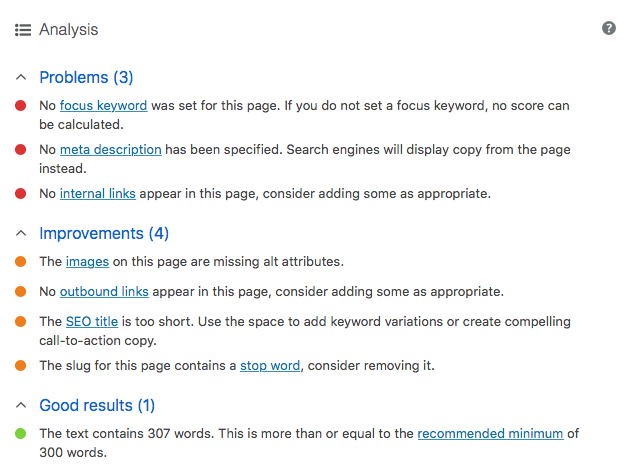
Although many people find these recommendations helpful, they are general suggestions and should not be followed by the book otherwise your posts may come across as robotic. They pick up on unnecessary changes such as a ‘stop word’ in a URL or the misuse of a ‘passive voice’.

This is the ‘original WordPress SEO plugin’ and was first created in 2007. Despite its age it is still the most actively used WordPress SEO plugin with around 3 million active installations and a 4.5 star average rating from 400 reviews.
It remains fairly user friendly but still includes advanced features. Some of these include a bot blocker, easy Google Analytics integration (used to view website stats) and free WooCommerce integration. This makes it ideal for online merchants. It is difficult to find many negatives with this plugin, it manages to please both advanced and beginner users.

This can be considered the underdog of the 3 plugins. Despite significantly lower active installations, it has great reviews. From under 200 reviews, 96% rated it 5 stars out of 5.
The setup has both pros and cons. It is one long list of settings but once they are finished, you are done. No notifications, no pressuring into upgrading, just a big list of potential features. However, there is little guidance throughout the setup which makes it unwelcoming to beginners. Instead it is tailored perfectly to experts who will no doubt appreciate its lack of unnecessary interference.
It also provides free support for WooCommerce which makes it ideal to online merchants.
There is no generic best WordPress SEO plugin, but we believe one of these plugins will suit everyone. Here are some guidelines to help you decide which one suits you best:
We hope this comparison helped you find the SEO plugin that best suits your site. If we left any out please to let us know in the comments.