Celebrate Earth Day 2024 with Small Business Initiatives
Celebrate Earth Day 2024 with our guide to small business initiatives that make a big impact on the environment.

We deliver a lot of emails. Our web hosting customers send an average of almost 40,000 emails per day. It is, therefore, essential that we have a robust email delivery system in place. We’re also focused on privacy, limiting the number of logs we wish to keep. However, we store anonymous email delivery statistics to allow us to improve and troubleshoot our email delivery system.
There are no surprises here – more emails get set on working days than at the weekend. In fact, Monday – Friday, around 50,000 emails go out per day, dropping to around half that, at 27,000 on the weekend. The quietest day of the year is always Christmas Day, less than 6,000 last year.
We only store the domain that mail is delivered to and have long been surprised at just how much email goes to a single place!
In 4th place, a stalwart of the free email world from 1997 – Yahoo! – receiving 2% of our outgoing mail.
In 3rd place, it’s the email addresses included with your internet connection. BTInternet, VirginMedia, Blueyonder etc. 7% of outgoing mail goes to these. Some of the brands have been extinct for a long time (Blueyonder merged with NTL in 2006 which in turn rebranded as Virgin Media in 2007) so people have had these addresses for some time. We rarely see AOL addresses these days but they were once very common!
Coming in 2nd place, the one that causes the most headaches for delivery, but does have very helpful staff – it’s Hotmail. Hotmail now sits under the Outlook brand, after being acquired by Microsoft back in 1997 and rolled into Outlook in 2012. Between them, they currently account for 9% of our outgoing mail.
If you’ve got this far, you’ve probably already guessed who comes in 1st place. Of course, it’s Gmail. Despite being the youngest of the group, launching in 2004, it’s now dominating our mail deliveries. They did report 1.5billion users in 2019 – a number that’s no doubt grown since. As a result, we’re seeing 42% of outgoing emails heading to Gmail accounts.
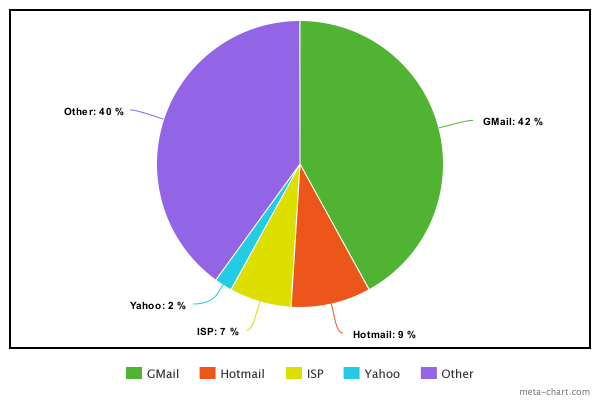
With 60% of all mail accounted for, any other domain accounts for less than 1% of our deliveries – but still 40% overall. These include the many fine individuals, clubs and businesses using our eco-friendly web hosting, and we love them all! Whilst free email accounts may be acceptable for personal use, your own domain always looks better. And for businesses, research has shown it can actually deter someone from contacting a business.
I hope you’ve enjoyed this brief look at our email delivery statistics. Email is still very important, choose a provider that does it properly.
When your website is hosted with NetWeaver, it’s always powered by renewable energy. We’ve been committed to reducing our impact on the environment for over 10 years now and are proud of our progress.
If you’d like the world to know your website is hosted sustainably, here are two ways you can do so.

The Green Web Foundation maintains a database of green web hosting companies, cloud providers and datacentres. You can use their website to check the energy used to power your website and get a badge to display to prove it’s green.

You can visit them here: www.thegreenwebfoundation.org
We also have a badge of our own that you can display. Who wouldn’t want to brag about using the best web hosting ever?

To use this badge on your site, just add the following code to your site:
<a href="https://www.staging.netweaver.uk" title="Green Web Hosting" target="_blank">
    <img src="https://fogg.netweaver.uk/badge.png" alt="Hosted by NetWeaver using Renewable Energy">
</a>
Renewable energy is an important step towards sustainable web hosting, but it’s not the only thing we do. If you’d like to read more about our environmental commitments, please visit this page.
You can further reduce the environmental impact of your website by keeping the page sizes small. WholeGrain Digital has produced an excellent website to help you to measure this: www.websitecarbon.com. You can view our report here.
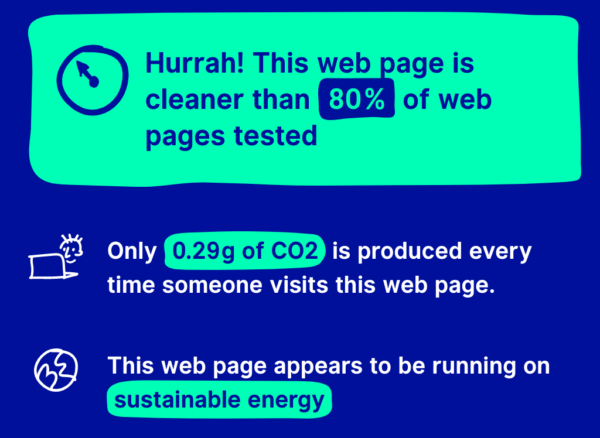
Being online takes up much more of the earth’s energy than we think. More than two per cent of the world’s greenhouse emissions are due to data centres. In the UK, facilities like these consume 41.11 Terawatt-hours per year or 12 per cent of the nation’s electricity consumption. Minimising our impact on the environment involves finding alternatives like green web hosting.
Green or eco-friendly web hosting lowers the overall ecological impact of web-based activity. Each hosting provider has a different way of reducing their clients’ overall carbon footprint, and one of the most popular ways is using renewable energy.
All data centres will need to use some electricity. What matters is how it produces that energy—this is the most significant factor contributing to a web hosting company’s carbon footprint. Green web hosting companies use wind or solar energy to power their services.
The type of energy a facility uses often relies on its location. For example, if your data centre is in a semi-arid area like Surrey, you can put solar panels on the roof and be done with it. However, not every host can do this. For other green web hosting providers, the solution is to purchase and use green energy credits.
There are other ways these web hosting companies can offer green services. Electronic security, climate control, and even the design and infrastructure of their building can reduce their carbon footprint.
When companies decide on a green web host, they have various reasons to do so. The first is a concern for the environment. Since the hosting industry produces a significant amount of emissions, carbon footprint reduction is everyone’s responsibility.
Using green hosting also improves a company’s image. If you already frame yourself as an eco-friendly business, having a green web host will reinforce that message. Energy-efficient hosting can also help you save money. The best part? You can pass those savings onto the customer.
Power consumption is one of the most significant issues in web hosting. Servers and cooling units both require electricity. You cannot turn them off without losing enormous amounts of traffic and annoying customers—consequently, the more websites to host, the greater the consumption of a hosting company.
Another reason why companies look into carbon neutral web hosting is that manufacturing server hardware and its components require plenty of power. It involves mining, chemical processing, and transportation across the globe, which all produce industrial waste. This aspect of building a web hosting company is harder to make eco-friendly; one option available to people is to buy Energy Star-rated servers.
The amount of land that data centres occupy, plus the resources needed to construct these facilities, also contribute to a company’s carbon footprint. Shared hosting is a viable solution—these services use fewer resources and land, which means a smaller footprint.
There are plenty of benefits to becoming a more energy-efficient company. Besides being great for your company’s marketing, choosing a green web host also means more savings for your business. Most of all, with an eco-friendly hosting solution, you know that you’re doing your part in making the digital space more sustainable.
Helping the earth doesn’t have a hefty price tag—NetWeaver’s green web hosting solutions start at £4.50 per month, including VAT. We have a genuine commitment to minimising our impact on the planet, and our environmental policy isn’t greenwashed. Let’s make a difference together!
Google Analytics is a free website analytics, or statistics, tool. It’s provided by Google and offers very powerful and detailed information on visitors to your website. As the most popular analytics service by quite a large margin, it’s estimated to be used by over half of websites.
This proliferation, however, is also what can lead to a search for alternatives to Google Analytics – and it comes from both sides of the ‘privacy’ argument. Some users may not trust that their visitor information can be kept private and want an alternative. Due to these concerns, Google Analytics is now frequently blocked by privacy plugins and even network-wide ad-blockers such as Pi-hole. This means you end up missing out on a significant amount of your visitors’ data.
Whatever your reason, here is our breakdown of alternatives to Google Analytics that are available to you:
If you use traditional web hosting (like the frankly amazing packages we sell) they often include visitor statistics with your package. These are generated from the servers log files meaning they cannot be blocked, but they are also far more restrictive in what you can find out from them.
There are three big packages in this space – Webalizer, AWStats and Analog. They are usually processed once per day and offer similar information, presented differently. None look particularly modern but do provide a free and accurate breakdown of visitors and popular pages. They can be accessed from your control panel.
If you run a server, or virtual server, and want quick and easy access to some usage statistics from your weblogs, this could be the answer. It can be installed from the EPEL repository on CentOS:
yum install goaccess
You then simply tell it where to see your log files, so for a standard NGINX install it would be:
goaccess /var/log/nginx/access.log
Press ‘space’ to select the log format, then return to analyse the log file.
You can then scroll down to view a variety of information.
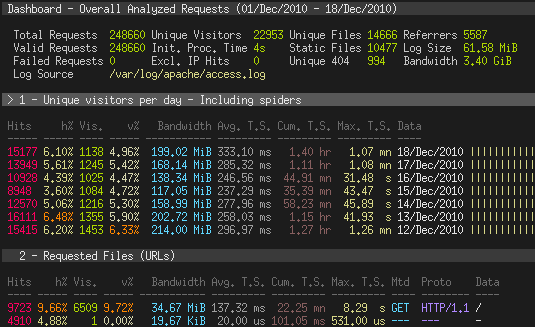
More details on GoAccess can be found here. We use this software to keep an eye on the usage of our mirror server – so we can see which repositories are getting the most traffic. There’s no need in this case for a detailed breakdown.
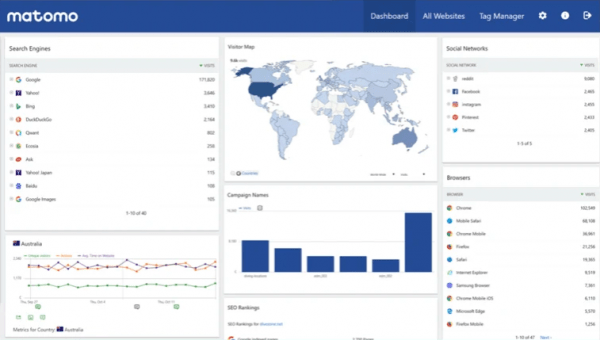
Matomo is installed in your webspace, it’s a PHP/MySQL application that offers similar features to Google Analytics. The big difference is that it’s self-hosted and open-source. It can offer far more detail than any of the log analysis methods above but does use up your system resources. For a busy website, you’ll need quite a lot of server power just to serve your analytics. If you like the look of Matomo it’s available via our Installatron system in your control panel – we’d advise using a subdomain for it.
You can use one Matomo installation for all of your websites, creating separate analytics for each of them. There’s a full list of features here.
Fathom Analytics was started as a privacy-respecting alternative to Google Analytics. It does not collect personally identifying information and doesn’t even use cookies – removing the need for the ultra-annoying ‘accept cookies’ pop-ups that we are bombarded with daily. By providing all the data you need to help grow your website and business without the cost being your users’ privacy we think this is a great option.
Full disclosure here – this is what we use ourselves across all our websites. It’s been in place since September 2018, 22 months at the time of writing. We love that we can see how our site is performing, what pages are proving popular and where our traffic is coming from. We also love that you can visit our site without us, or anyone else, tracking where you’ve been.
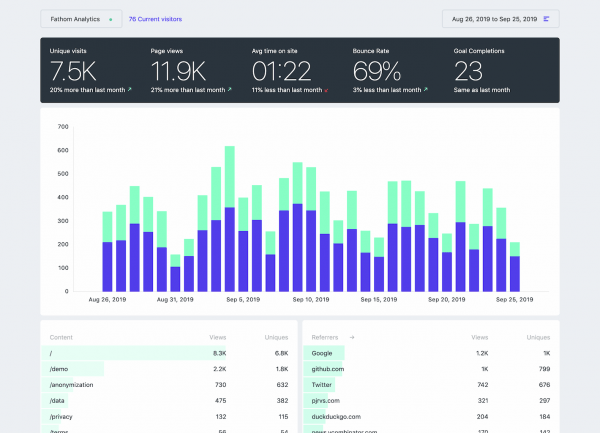
Fathom Analytics is a hosted service, all you have to do is install a small piece of code onto your site. They’re adding new features all the time too. There’s a 7-day free trial, then prices start at $14/month.
I hope you’ve found something of interest in this breakdown of alternatives to Google Analytics. If you know of any other options or have any views on those included here, please comment below. I’d be pleased to hear your thoughts.
*Links to Fathom Analytics are affiliate links, however, this has not influenced the content of the article. We have tried all of these options and have settled on Fathom for our use.
Nobody likes receiving spam, yet it accounts for over 50% of all email. As such, spam filtering has become big business. We use a combination of RBL, firewall rules and heuristics to help prevent spam in your inbox. We’ve recently been further developing our email delivery systems to ensure your sent mail arrives at its destination.
Historically, each server would deal with its own email. This seems like a good idea as spam from one server won’t affect another, so problems are less likely. As each server sends a relatively small amount of mail, the trust needed to enable successful delivery to big providers like hotmail, gmail etc was proving difficult to build. Hotmail, for example, doesn’t save reputation data for any host sending less than 100 emails to them per day, resulting in an instant ban if they suspect an email is spam.
At the other end of the spectrum, if we run a single outgoing email server and a user sends spam or has their account compromised, we run the risk of mail for all users being blocked. So, a new solution was needed.
Gradually, over a number of months, we built up the reputation of a range of IP addresses for sending mail. Once these were prepared, we’ve set up a system using these IPs for mail servers. All outgoing mail from any of our servers (once checked for mail volume limits and spam/virus content) is forwarded to this new service for delivery.
Mail delivery is attempted from a random address, successful for around 95% of mail. Where it cannot deliver it passes the mail back into the queue to retry. This may be due to rate limiting, reputation, filter rules or any other reason at the receiver end. The delivery is re-attempted from a different IP address until it is successful. Where a receiving server indicates that an IP has been blacklisted, this is temporarily removed from the pool for investigation.
We use some excellent open-source software to power our mail systems. As with all our services, CentOS is our Linux of choice. Beyond that, the mail queue is stored in a MongoDB database, a Redis instance is used to store session data and cache DNS lookups and ZoneMTA, powered by NodeJS is used to deliver mail.
We automatically add SPF and DKIM records to your account when it’s setup. You can manage these further through your control panel by visiting the ‘Email Deliverability’ section in your control panel. These DNS records verify that your email is legitimately coming from your domain, helping to ensure delivery and to help block anyone who many be impersonating you.
Using this powerful combination of servers you can be confident that if it’s possible for your mail to be delivered, it will be! Furthermore, this service is included as standard with all of our web hosting accounts.
Are you thinking about building your business brand online? If so, you need to create a website. A website will ensure that you have a platform where you can share content and engage with an audience online. To build a website, you can use a CMS or content management system. There are many examples of content management system software including WordPress, ExpressionEngine and Ghost. The alternative would be to build up a website from scratch.
Let’s explore content management systems in more detail and discover why it’s a far better option than building your own site from the ground up.
Typically, a CMS will be a computer application or a set of programs. You can use this to both create and manage digital content. This includes blog posts, articles and webpages. You will be able to add content to your website and then edit or delete it. Ultimately, a CMS gives you complete control over what content is published on your website at any time.
But this is actually just the tip of the iceberg of what a CMS allows you to do. As well as providing web-based publishing, a CMS system will also allow you to manage the format. So, you can change the aesthetic and style of your website with a few clicks. You might also be able to complete indexing and use the CMS system to optimise your site too. If you are working in a large business, it might be possible to provide different permissions to users.
You can then decide who has control to change what. Each person can have individual permissions depending on their role in your company.
Years ago a CMS was not an affordable option for the typical business. Instead, companies and particularly small businesses were forced to rely on HTML. This was a time-consuming process but it certainly beats spending hundreds of thousands of dollars on this type of software. However, times have changed and now content management software such as WordPress is accessible to all. In fact, WordPress, is available for free online.
You’ll be amazed at how many different businesses and organisations use these type of CMS setups. University websites, small business websites, blogs, real estate property websites and movie databases are all often run using a CMS.
So why is using a CMS so popular and what benefits will you get compared to building a website from scratch?
Most of the popular CMS options available on the market today are free to use. For instance, you can install WordPress on your web hosting account automatically and without charge. As mentioned, there are premium options for content management software you can typically sign up for but this is completely scalable. Ultimately, that means regardless of your business model, a CMS will fit into your business budget even if you choose to avoid paying for the software completely.
A content management system is designed to be completely user-friendly. You don’t need to have a degree in computing or qualifications in website design to access this software and gain the most from it. Instead, it is possible to publish a piece of content through WordPress in minutes. That does include the time it takes to ensure that it looks professional and you can even guarantee that it is optimised. These software systems provide an easy solution where you can fill in different settings and boxes before you hit publish.
When you explore a preview of the content you’ll discover the system has laid it all out for you.
Crucially, content editing is completely separate from the functionality and design of the website. A website is a lot like a theatre production. As impressive as everything looks on stage, there’s a lot going on behind the curtain. With a CMS you don’t have to worry about anything like this and instead can simply focus on adding content that will look great. You don’t have to know anything about coding or design. All of this is taken care of behind the scenes.
As such, you could save a fortune because you won’t need to hire a professional to publish your content. Instead, if you’re paying by the hour your marketing team or outsourcing expert they can focus on other areas of your campaign that are more complicated.
A website should never be stagnant. If your website never changes it will quickly bore users. You need to add fresh content on a regular basis, even making changes to web pages, headers and sidebars. This keeps your website fresh and exciting. Without CMS, doing this requires playing with the coding of the site. This involves expertise and a lot of time. With a CMS changes like this can be completed within minutes. If you want to change multiple pages on your site and give it a fresh look, you’ll still only need to schedule an hour in the business day. The best part is this won’t look like a rushed job. Using a content management system, your website can look professional, stylish, modern and most importantly, well maintained.
When you explore the options that a CMS provides you will find SEO features. This means that you can optimise your site to ensure that any content you do publish will help with the ranking. You can even find plugins which will provide you with information on the best ways to improve a piece that you are publishing. Without a CMS you will be on your own when it comes to SEO. You will have to hire a marketing specialist. With a CMS, SEO optimisation becomes a lot easier and significantly more automated. It even makes the option of DIY SEO far more accessible to the typical business owner.
We hope this helps you understand the key benefits of a CMS and why it’s a far more attractive option than building a website from scratch.